
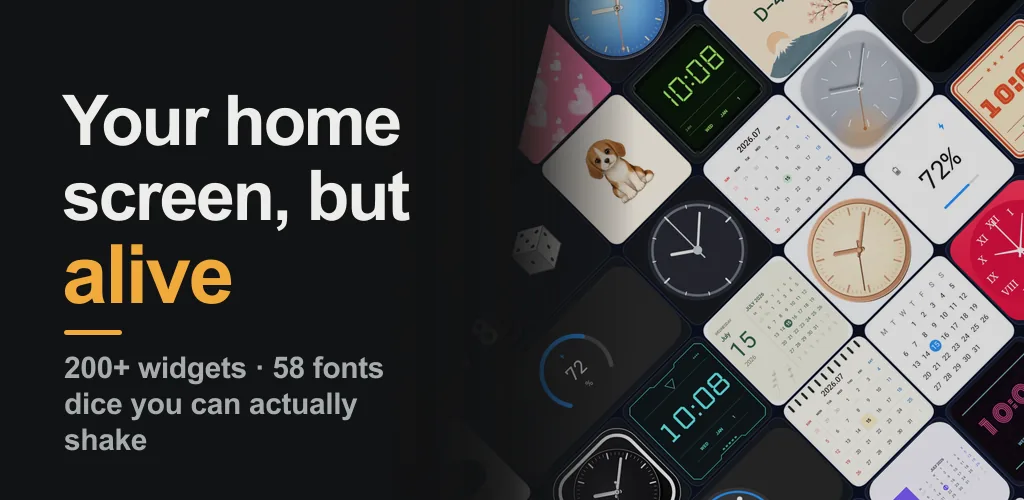
Your home screen,
but alive
Widgetory is a home screen widget gallery: 200+ designs — clocks, countdowns, calendars, battery meters — and an editor deep enough that the widget you place is yours, not a preset someone else picked.
- 200+ widgets
- 58 fonts
- Recolor every part
- Android 9+
Customize almost everything
Two copies of the same design can look nothing alike. Every placed widget keeps its own settings, and a live preview shows the real result before it reaches your home screen.
-
Recolor each part on its own
Dial, hands, second hand, date, weekday, today, labels, values, icons, gauges, dividers, AM/PM — each one separately.
-
58 bundled fonts
Seven-segment, pixel, neon, monospace, serif, display. Different elements in one widget can use different fonts.
-
Backgrounds and shape
Solid, gradient, or fully transparent with an opacity slider. Corner radius from square to fully rounded.
-
Options that matter
12 or 24 hour, second hand on or off, week starting Sunday or Monday, today marker style, separate weekend colors.
-
Four moods per design
Light, Dark, Glass, and Accent variants turn one design into four without starting over.
-
Save as “My preset”
Keep any combination you like and reuse it on another widget later.
Widgets that don’t just sit there
Shake the phone and the dice roll. Tilt it and the snow globe swirls. Look again and a cat is dancing on your home screen.
-
Dice you can actually shake
Shake the phone or tap the widget and they roll to a new face.
-
Snow globe
Tilt it and the snow scatters, then settles again.
-
Cats, and a puppy
A moonwalk, a groove, a paw dance, two cats waving, a cat at the window, a napping black cat, a head-tilting puppy.
-
Shooting stars and more
Stars across a night sky, floating hearts, a sweeping radar.
Moving widgets need Android 16. On older devices they are hidden from the list, so you will never add one and find it frozen. Every other widget, and the whole color and font editor, works on Android 9 and newer.
A flip clock that really flips
At every minute the top leaf folds down on its hinge, the bottom leaf unfolds and settles with a small rebound. Not a still image.
-
Nixie tube clock
The warm orange glow breathes and flickers the way real tubes do.
-
Flip-dot clock
Dots turn over mechanically, each column staggered a beat behind the last.
-
Digital, many ways
Dot matrix, glitch CRT, pixel, terminal, and neon brick.
-
Analog, many moods
Aurora, rose gold, neon rim, moon phase, pastel sky.
Dates, schedules, battery
-
Countdowns
Days left to a birthday, an exam, a trip — with your own title, target date, and icon.
-
Calendars
Month grid, week strip, date cards, today’s agenda.
-
Battery and tools
Charge level at a glance, plus a calculator and a unit converter.
-
Nothing gets clipped
Each widget is rendered for the size it will actually occupy. 2x2, 4x2, and 4x4, dark-mode friendly.
Light and private
-
Widgets work offline
Home screen widgets keep working without a connection.
-
Calendar access is optional
Read-only access is requested only if you choose a widget that shows events. Events are drawn on the device, never stored or transmitted.
-
No ads on your home screen
Ads appear only inside the app, never on the widgets you place.
-
Settings stay on your device
They are removed when you uninstall. Analytics, crash diagnostics, and ad-delivery data go to Google services — see the Privacy Policy.
Frequently asked questions
- Is Widgetory free? Do I need an account?
- Yes, it is free, and there is no account or sign-in. Ads appear only inside the app, never on the widgets you place on your home screen.
- Which Android versions does Widgetory support?
- Android 9 and newer. Widgets are rendered for the exact size they occupy (2×2, 4×2, 4×4) and adapt to light and dark mode.
- Do the widgets work offline?
- Yes. Clocks, countdowns, calendars, battery meters and the animated widgets keep working without a connection. An internet connection is only used inside the app for ads and diagnostics.
- What permissions does the app ask for?
- None up front. Read-only calendar access is requested only if you choose a widget that shows your events, and the events are drawn on the device rather than stored or transmitted.
- Can I change the colours, fonts and background of a widget?
- Yes. Each placed widget keeps its own settings: recolour every part separately, pick from 58 bundled fonts, choose a solid, gradient or transparent background, and save the result as a preset you can reuse.
- What happens to my data if I uninstall?
- Widget settings and the content you entered live only on your device and are removed with the app. Analytics, crash diagnostics and ad-delivery data go to Google services as described in the Privacy Policy.
A bare home screen deserves better
Free on Google Play. Available in English and Korean.
Get it on Google PlayMissing a widget you want? Tell us — lifesoftwarelab@gmail.com